
Start earning weekly commissions by becoming a certified Vone App agent. Whether you’re new or experienced, this guide will walk you through every step — from registering your agency and inviting hosts to managing your team and boosting your earnings.
You’ll learn how to:
- Apply as a Vone App agent using your Vone ID
- Understand the commission structure (up to 20%)
- Withdraw your earnings securely
- Invite hosts, sub-agents, and grow your network
Table of Contents
About Us
We are an officially registered affiliate agency working with Vone App. Our mission is to help new users become Vone App agents, recruit hosts, and manage their teams efficiently to maximize their commissions.
By registering through our platform, you’ll get access to:
- ✅ Official agent registration forms
- ✅ Step-by-step onboarding guides
- ✅ Strategies to manage your agency and grow your earnings
What is Vone App Agents?
Vone App Agents is an independent affiliate website that helps users register and manage their own agency within the Vone App platform.
We are not the developers of the app — instead, we act as a guide for aspiring agents who want to build their team, invite hosts, and earn commissions through the official Vone App agent system.
Our platform simplifies the process by providing:
- 🔗 Access to the official Vone App agent registration form
- 📘 Step-by-step instructions to set up your agency
- 💼 Tools and tips to grow your network and increase earnings
- 🤝 Support for inviting both hosts and sub-agents
How to Become a Vone App Agent
To become an official agent in Vone App, follow these simple steps using the official registration form provided by the platform.
Whether you’re new or experienced, this guide will help you register, invite hosts, and start earning weekly commissions.
Here’s what you need to do:
- Download the Vone App from Google Play or App Store.
- Create your account and copy your Vone ID from your profile.
- Open the official agent registration form.
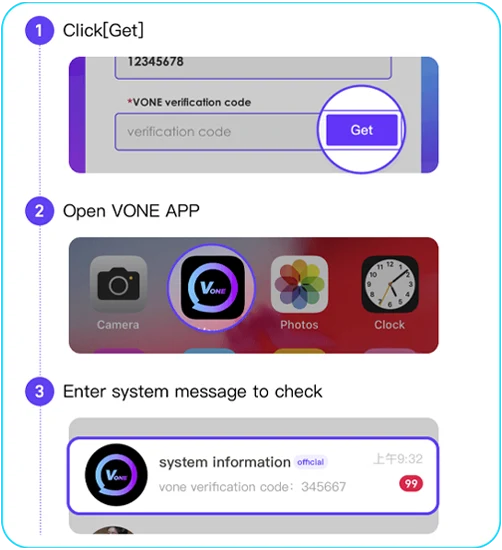
- Enter your Vone ID and click “Get” to receive your verification code.
- Check your messages inside the Vone app to find the code.
- Click “Submit” on the form to complete your registration.
Once approved, you’ll gain access to your agent panel, where you can manage your team, invite hosts and sub-agents, and track your commissions.
How to Make Money on Vone App as an Agent
Vone App agents make money by building and managing a team rather than streaming themselves. After your agent registration is approved, you can invite hosts and other agents through the Agent Center. Your commission depends on the eligible activity generated by your team and your current commission level.
To start earning as a Vone App agent:
- Complete the agent registration process and access your Agent Panel.
- Invite active hosts and help them understand how the platform works.
- Recruit other agents to expand your network.
- Monitor your team’s activity and commission level.
- Follow the current activity and payment rules shown inside Vone App.
The amount you earn is not fixed or guaranteed. It depends on your team’s performance, your commission tier and the current rules established by Vone App. Review the commission structure below to understand how the available levels work.
Vone App Agent Commission Structure
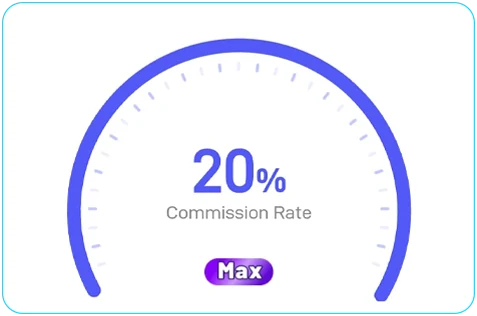
Vone App offers a dynamic commission system based on your total earnings over the past 30 days. The more you and your invited agents generate, the higher your commission level — up to 20% at the maximum rank.
Summary of Commission Rules
- Commissions are calculated from:
- Your host’s total earnings (calls, gifts, messages)
- The earnings of agents you’ve invited
- You must remain active (no inactivity over 7 days)
- Commissions are updated in real time and paid via points
Commission Levels
| Level | Total Earnings (Last 30 Days) | Commission Rate |
|---|---|---|
| D | 0 | 4% |
| C | 2,000,000 | 8% |
| B | 10,000,000 | 12% |
| A | 50,000,000 | 16% |
| S (Max) | 150,000,000+ | 20% (Maximum Level) |
✅ Agents at S level earn the highest commission rate of 20%, based on combined team performance over the last 30 days.
How to Invite Hosts in Vone App
Once you’re registered as an agent in Vone App, you can start building your team by inviting hosts directly from the app.
Here’s how to do it:
- Open the Vone App and go to the Agent Panel.
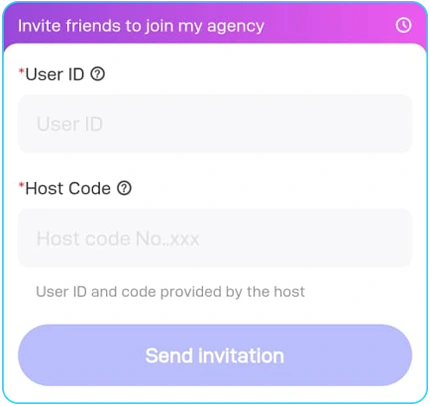
- Tap on the option “Add Host” or “Invite more hosts”.
- Enter the User ID of the host you want to invite.
- Enter the Host Code provided by that user.
- Tap “Send invitation” to submit the request.
✅ If the host is not already part of another agency, they’ll receive your invitation and, once accepted, they’ll automatically be added to your agency team.
How to Invite Agents in Vone App
In addition to inviting hosts, Vone App allows you to expand your agency by recruiting new agents. This process is visual, quick, and accessible directly from your agent dashboard.
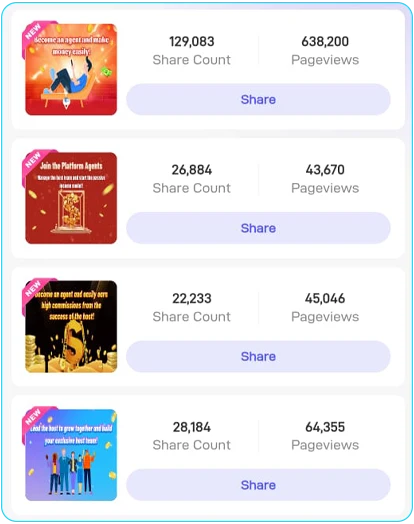
Inside the Agent Center, you’ll find a dedicated “Invite Agent” section where you can access a variety of pre-designed templates — promotional images with your personalized referral link. These templates are ready to share across social platforms and messaging apps.
Step-by-Step Guide:
- Open the Vone App and log into your account.
- Go to the Agent Center and tap on “Invite Agent” from the main menu.
- Browse through the available invitation templates, which include promotional banners and posters.
- Tap “Share” on the template you like — your personal referral link is already embedded.
- Send the link via WhatsApp, Telegram, social media, or email.
- When someone uses your link to apply and gets approved as an agent, they will automatically become part of your agency.
🔗 Important: All links lead directly to the official agent registration form. Once the person submits the form and is accepted, they’ll appear in your agency dashboard as a sub-agent.
Frequently Asked Questions (FAQ)
How much can I earn as a Vone App agent?
Agents can earn up to 20% commission depending on their team’s performance over the past 30 days.
Do I need to go live or host to be an agent?
No, agents do not stream. Your role is to recruit and manage hosts and other agents.
Can I be an agent and a host at the same time?
No. You can only choose one role: agent or host.
How do I invite hosts to my agency?
Go to your Agent Panel in the Vone App, tap “Add Host,” and enter the host’s ID and code.
How can I track my commissions?
Your agent dashboard updates commissions in real time. You’ll see stats based on host and agent performance.
What if the host is already in another agency?
The system will not allow the invitation if the host is already linked to an existing agency.
How do I invite other agents?
Go to “Invite Agent” in the app and share one of the branded templates containing your referral link.